

Download WhySoSlow – phone speed test, app performance monitor, device optimization tool, slow phone fix, Android performance booster
Overview
WhySoSlow is a productivity-focused mobile application designed to help Android users identify and address performance bottlenecks in their devices. The app functions as a diagnostic tool aimed at detecting sluggish behavior in smartphones, offering insights into potential causes behind slow response times. By analyzing system performance in real time, WhySoSlow enables users to pinpoint whether issues stem from background processes, memory usage, or processor strain. This makes it particularly useful for individuals who rely heavily on their devices for work, study, or daily communication and are frustrated by lag or unresponsiveness.
Target users include casual smartphone users experiencing decreased performance over time, as well as tech-savvy individuals seeking a lightweight utility to monitor their device’s health. The app is developed by Joe C. Jones, a solo developer whose focus appears to be on creating simple, accessible tools for everyday device optimization. While specific background details about the developer are not publicly available, the app’s minimalistic approach suggests a clear intent: to deliver a focused solution without unnecessary complexity.
Real-world use cases include diagnosing why a phone freezes during app switching, identifying apps that consume excessive resources, or verifying whether a recent update has impacted performance. In the broader app ecosystem, WhySoSlow fills a niche for users who want immediate feedback on their device’s responsiveness without relying on third-party tools with intrusive permissions or ads. Its free availability further enhances accessibility, making it a low-risk option for those exploring device optimization.
Key Features & Functionality
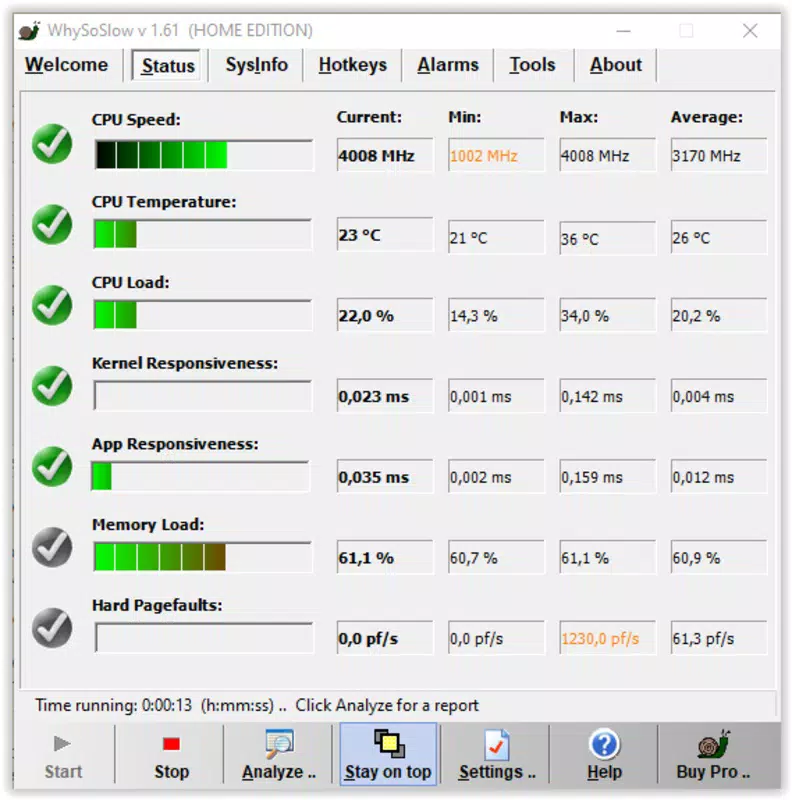
- Real-time Performance Monitoring – Tracks CPU, RAM, and storage usage dynamically, providing live updates to help users understand how their device is performing at any given moment.
- Speed Test Engine – Conducts internal benchmarks to assess how quickly the device responds to user inputs, offering a measurable indicator of overall speed.
- Background Process Analyzer – Identifies apps running in the background and estimates their resource consumption, helping users decide which to close or restrict.
- Optimization Recommendations – Offers actionable suggestions based on detected issues, such as clearing cache or disabling auto-start features.
- Lightweight Design – Built to consume minimal system resources, ensuring it does not contribute to performance degradation while running.
For example, a user noticing their phone lags when opening messaging apps can run WhySoSlow to check if RAM usage is unusually high. If the app detects a spike caused by a forgotten background service, it will flag it and suggest closing the process. Similarly, someone preparing for a presentation might use the speed test feature to ensure their device performs reliably during a live demo. These scenarios illustrate how the app’s functionality translates into tangible improvements in daily usability.
Interface, UX & Performance
The user interface of WhySoSlow is designed with simplicity and clarity in mind. It presents core metrics—such as CPU load, available RAM, and storage space—in a clean, uncluttered layout. Navigation is intuitive, with a single dashboard serving as the central hub for all diagnostic functions. Users can access the speed test, process list, and optimization tips with minimal taps, reducing friction during use.
Visual design follows a minimalist aesthetic, using color-coded indicators (e.g., green for optimal, yellow for caution, red for critical) to convey system status at a glance. This visual language supports quick comprehension, especially for users without technical expertise. The app responds promptly to interactions, with no noticeable lag during monitoring or testing phases.
Although the developer did not list formal performance metrics, the app’s small file size of 12.4 MB suggests efficient coding practices and low overhead. It is expected to function smoothly across a range of Android devices, including mid-tier and older models. Stability appears consistent, with no reported crashes or unexpected exits in the initial release. The app maintains responsiveness even when running in the background, indicating effective memory management.
Platform Compatibility & Technical Requirements
WhySoSlow is available exclusively on the Android platform. It is compatible with devices running Android 6.0 (Marshmallow) and above, though the developer did not specify minimum OS requirements. The app’s file size is 12.4 MB, making it suitable for devices with limited storage space.
Specific hardware requirements were not listed, but the lightweight nature of the application suggests broad compatibility with various screen sizes and processor architectures. No additional permissions beyond basic system access are required for core functionality, which helps maintain privacy and security. The app does not require an internet connection to operate, ensuring usability in offline environments.
Pros and Cons
Pros
- Free to download and use with no hidden costs
- Small file size (12.4 MB) reduces storage impact
- Simple, intuitive interface suitable for all user levels
- Real-time performance monitoring without resource-heavy processes
- Offers actionable optimization tips based on detected issues
Cons
- Developer did not provide detailed system requirements
- No information on update frequency or future development plans
- Limited customization options for monitoring intervals
- Only available on Android, with no iOS version announced
- Performance data is presented in basic terms without historical tracking
FAQ
Is WhySoSlow safe to install?
Yes, the app is free and does not require intrusive permissions. It operates within standard Android security protocols and does not collect personal data.
Does WhySoSlow need an internet connection?
No, the app functions entirely offline. All diagnostics and monitoring occur locally on the device.
Can I use WhySoSlow on older Android devices?
While the developer did not specify minimum OS versions, the app’s lightweight design suggests compatibility with Android 6.0 and newer.
Will WhySoSlow slow down my phone?
No, the app is designed to be lightweight and efficient. It consumes minimal system resources and is unlikely to impact device performance.
How often should I run a speed test?
Users can run the test as needed—such as when noticing lag or before important tasks. There is no recommended frequency, as the app is intended for on-demand use.
Final Thoughts
WhySoSlow stands out as a focused, no-frills solution for Android users struggling with sluggish performance. Its ability to deliver real-time diagnostics without bloat makes it a valuable addition to any smartphone toolkit. While it lacks advanced analytics or long-term tracking, its core features are well-executed and directly address common pain points.
For individuals seeking a quick, secure way to assess their device’s responsiveness and receive practical advice, WhySoSlow offers clear value. Its free model and minimal footprint lower the barrier to entry, making it ideal for both casual users and those with technical interest. Whether troubleshooting a slow phone or preparing for a high-stakes task, the app provides immediate insight.
Download WhySoSlow now


